by Jeffrey Putney | Mar 7, 2015 | Fab Academy
Scanning For scanning this week I used an XBox Kinect and the ReconstructMe software package. The scan process was as simple as starting the script and rotating slowly while I stood in front of the Kinect. I then fixed a few holes and cleaned up the bottom edges with netfab Basic. To make sure eveything the final model was in good shape I opened it in Tinkercad and checked that I had some humanoidish object like looked a little like me. STL file of the scan can be downloaded here. 3D Printing The goal for 3D printing this week was to create something that couldn’t easily be made by a subtractive fabrication technique. So I chose to remix this Math Gyro Maker part that provided a good template for interlocking rotational joints. I modified the outer and inner ring to recreate the logo from the Heartland Maker Fest event I help organize. Here’s the first print from our Up Mini 3D Printer printing with ABS plastic: The rotational joints were a bit loose and could have been made with tighter tolerances, but they worked perfectly. And it’s a necklace! The final STL file can be downloaded...

by Jeffrey Putney | Feb 24, 2015 | Fab Academy
This week the goal was to created and populated FabISP boards. I followed the instructions provided here. The only change I made was to edit the original design slightly so use an oscillator instead of a crystal. I Also added a hedgehog to the board to make it clear which FabISP was mine. Next I cut the board on the Roland Modela. I then used the the tCream layer from Eagle cad as a template for a solder mask I created on the vinyle cutter. This allowed me to nicely screen print solder paste onto the board. Then it was time for the oven. I plugged in the board and it passed the smoke test. I was then able to use Crosspack and Xcode to program the progremmer with another programmer. Once programmed the extra solder bridge and resistor was removed and the board was ready for...
by Jeffrey Putney | Feb 18, 2015 | Fab Academy
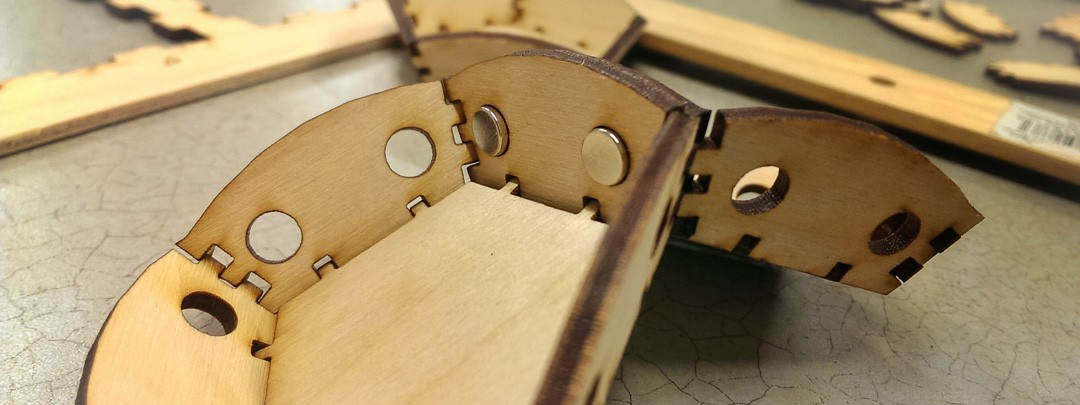
Assignments for the week: Use a computer controlled cutting tool to make a pressfit objects can that can build into larger objects. Learn how to design pressfit objects that account for the physical realities of fitting them together. Violate a patent. (well this became a personal goal once I realized that what I wanted to make would in fact violate one ) So let’s violate a patent. It’s easy! A few weeks ago a friend showed me a bunch of small parts he 3D printed that would assemble into a polyhedron when you put a bunch of them in a box and shake them up. Aparently he had found the design on Thingiverse, printed his own copy, and then shared a picture of it back on thingiverse. He then got a message that said what he created most likely violated this patent, which basically claims that only one person in the US has the right to make a polyhedra that snaps together in only one way using magnets. The message also said that if he was only printing it for educational purposes he was probably safe from legal attack. Then the entire model page went missing from the thingiverse. So I decided to recreate a new pressfit version this week. First the sketch I started by modeling a single side in blender. I then used the the UV Unwraping function to create a cut pattern for each side. Blender allows you to save a high resolution bitmap of the side which I then opened up in Illustrator to create a final vectorized version for cutting. Here is the Blender File. Time to...

by Jeffrey Putney | Feb 11, 2015 | Fab Academy
This week we’re learning CAD programs. Which I’m choosing to believe stands for Computed ADorableness. Goals for this weeks: Try out some new 2D and 3D CAD tools. Model something I might like to create. Background I once made a fox plush doll version of myself to send away with a friend who was moving out of town. I really liked how it came out so I’ve decided I will try using some 2D and 3D design tools to sketch out a new plush doll pattern based on my cat and model it. This way I can also use the 2D sketch as a laser cutting pattern for cutting the felt which should save a huge portion of the construction time. (To the right is the original “Little Fox Jeff” I’m using as a reference) 2D Sketching I decided to go with illustrator for my 2D even though I’m sure InkScape would have been just as easy. Next I pulled out all the pieces what would need be laser cut and seperated them by color. Here is the 2D file. 3D Modeling Next I wanted to get an idea of what the finished doll would look like so I decided to give blender a try and follow some character creation tutorials where you start with a sketch of your model and extrude out a 3D model based on it. Then there was a few hours of pushing points around the screen and learning to light and shade things. But I think I got what I was looking for. The next step is probably applying the hand stitch details from...

by Jeffrey Putney | Feb 4, 2015 | Fab Academy
I’m starting Fab Academy Thanks to a generous opportunity from from the CU Community Fab Lab I was able to join the 2015 Fab Academy class. To summarize the Fab Academy’s description of itself: The Fab Academy is a 5 month program offered every year that aims to teach specific technical skills which are particularly relevant to Fab Labs and digital fabrication centers around the world. Fab Academy provides familiarity with technical options and capabilities, hands-on experience, and direction for further study. Fab Academy works off a distributed educational model in which each participating Fab Lab is part of a global Fab Lab / Fab Academy network. Students view and participate in global lectures broadcasted from MIT every week. The lectures are recorded and available to students throughout the semester. In addition to the lectures students have access to local digital fabrication equipment and personal help with projects from instructors and peers. Some of the topics covered include: digital fabrication principles and practices, computer-aided design, manufacturing, and modeling, computer-controlled cutting, electronics design and production, computer-controlled machining, embedded programming, 3D molding and casting, collaborative technical development and project management, 3D scanning and printing, sensors, actuators, and displays, interface and application programming, embedded networking and communications, machine design, digital fabrication applications and implications, invention, intellectual property, and business models, digital fabrication project development Assignments for this week: Decide on a potential final project idea. Create my first Fab Academy blog post. Learn the basics of using Mercurial. First Thoughts on a Final Project All the things! So I actually have no thoughts on a final project yet. But would like for it to be awesome. So I’ll just keep this video here for motivation: And I realize that’s barely a...
by Jeffrey Putney | Feb 1, 2015 | Fab Academy
I’ve just started my first week at in the 2015 Fab Academy class.It’s taught at Fab Labs around the world and once a week we join a large video conference so that in theory we can all come together and share experiences. I’m taking the course at my favorite little Champaign Urbana Community Fab Lab and our local group is being led by the awesome Mercedes Mane. The class describes itself as a Digital Fabrication Program that provides advanced digital fabrication instruction for students through an unique, hands-on curriculum and access to technological tools and resources. So in theory I’ll be learning all the most common fabrication techniques found in Fab Labs around the world and doing hands on projects each week so show some arbitrary level of competence in each field. There is also a semester long project I’ll need to complete that should integrate multiple fabrication techniques into one project. What this project will be I’ve yet to decide. We also have to keep an ongoing blog about that tracks our progress and projects each week. You can find my blog and the rest of our local groups here: Jeffrey Putney Virginia Mccreary Jessica Nelson Gabriel Ewing Colten Jackson But their system for managing their webspace seems insane and apparently breaks a lot… so I’ll also be reposting all my updates here with the Fab Academy category as well...